
Qubicweb reading view
Avira Prime for Mac review: Strong malware protection and useful cleanup tools
Internal Read means the full piece stays on Qubicweb, with its source path and context still visible.
Brief points
- Macworld At a GlanceExpert's Rating Pros Strong core malware protection Excellent scanning and scheduling interface Effective junk and application removal Good everyday VPN perf...
- However, its VPN lacks advanced features, Identity Assistant failed during testing, and some malware components were left behind.
- Despite these shortcomings, it’s a capable security suite worth trying during its 30-day trial.
At a Glance
Expert's Rating
Pros
- Strong core malware protection
- Excellent scanning and scheduling interface
- Effective junk and application removal
- Good everyday VPN performance
Cons
- Some malware components left behind
- Limited advanced VPN features
- Identity Assistant failed during testing
- Inconvenient cookie searching and scan logs
Our Verdict
Avira Prime offers strong Mac malware protection, excellent scanning and scheduling, and useful cleanup tools. However, its VPN lacks advanced features, Identity Assistant failed during testing, and some malware components were left behind. Despite these shortcomings, it’s a capable security suite worth trying during its 30-day trial.
Price When Reviewed
This value will show the geolocated pricing text for product undefined
Best Pricing Today
Price When Reviewed
From $59.99 for first year, then $109.99 a year.
Best Prices Today: Avira Prime
What is it: Avira Prime is a comprehensive Mac security suite combining antivirus and malware protection with a VPN, password manager, privacy features, and useful cleanup and system-maintenance tools.
Who is it best for: Mac users looking for a comprehensive security suite that combines antivirus protection with useful cleanup, application-removal, and system-maintenance tools.
Who should skip it: Users who need advanced VPN capabilities, detailed security reporting, or dependable identity-monitoring features may find that Avira Prime doesn’t go far enough.
At a glance
Protection: ★★★★☆
Performance: ★★★★☆
Features: ★★★★☆
Ease of use: ★★★★☆
Value: ★★★★☆
There are times when the focus seems right, the execution doesn’t quite match, but there’s still a good utility to be had anyway. Enter Avira Prime, the security and utility suite from longtime developer Avira, which now stands at version 2.3.10 and has been dubbed “Avira Security” at the application level.
Available for macOS 10.15 (Catalina) or later, the latest version combines antivirus and malware protection with a VPN, password manager, privacy features, and a range of cleanup tools. Testing on a MacBook Pro running macOS Tahoe 26.6.2 revealed strong core protection, an impressive scanning interface, and some genuinely useful utilities, alongside a few missed opportunities and one feature that failed to work properly.
Features: What do you actually get?
Avira Prime breaks down into Security, Privacy, and Performance categories from the home screen. The Security category offers Virus Scans, Protection Options, and Quarantine, while the Privacy and Performance sections offer VPN, Passwords, Cookie Cleaner, Identity Assistant, Junk Cleaner, Uninstaller, and Startup Apps tools. Other features include a Status indicator, Activity history, and a Scheduler.
There’s a good set of genuinely focused tools here without going overboard, although their usefulness varies.
Malware protection
Foundry
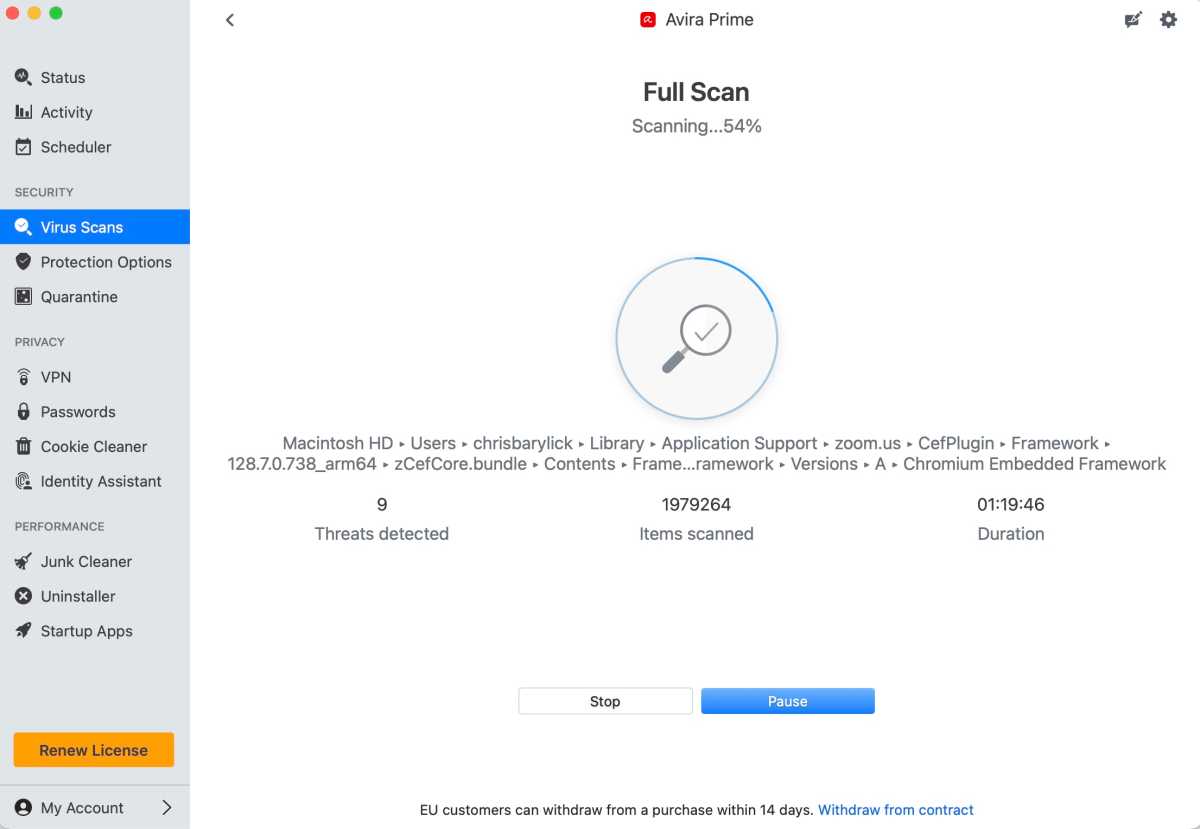
Antivirus and malware removal remain Avira’s bread and butter, and what’s there is impressive.
The application offers Quick, Full, and Custom Scans, with the latter allowing you to drag and drop volumes for scanning or locate specific volumes, folders, or files through the Finder. It’s a flexible approach that makes it easy to check an external drive or investigate something suspicious without having to run a complete system scan.
This combines with customizable settings for Real-time Protection, Download Protection, and USB Protection, the latter checking USB devices as they’re connected. Avira also integrates well with macOS’s built-in XProtect and Gatekeeper protection features.
The Quarantine tool displays the file paths where malware was discovered, allowing you to review the findings. Unfortunately, the lack of a convenient scan-log export function makes more detailed reporting tedious, particularly if you’re considering Avira Prime as an office systems-administration tool.
VPN and password management
Avira Prime offers VPN functionality through its Avira Phantom VPN application, and the results are something of a mixed bag.
The VPN itself performs well, offering good throughput speeds, reliable streaming, and an easy way to change geolocations as needed. The interface is straightforward, and the core functions should be enough for casual browsing and streaming.
That said, it’s a bare-bones client compared with more advanced VPN applications. Features such as port forwarding and split tunneling are limited or unavailable, and performance through peer-to-peer applications can be substantially slower. What’s present works, but users who depend on these capabilities may want to look elsewhere.
Unlimited VPN data is part of the Prime package, alongside password management and additional privacy tools, while the separate Phantom VPN application also offers a limited free allowance of 500MB per month, along with standalone subscription options.
Like a number of its competitors, Avira is also chasing the password-management market. The Avira Password Manager extension supports Safari, Chrome, Firefox, Edge, and Opera, and has you create an Avira account and a master vault password.
Once installed, it was easy enough to create a CSV file from my existing system passwords, which imported cleanly into the extension. From there, the manager activated as needed throughout my normal workday. It’s a useful addition, although anyone already committed to a separate password manager may not find much reason to switch.
Cookie Cleaner and Identity Assistant
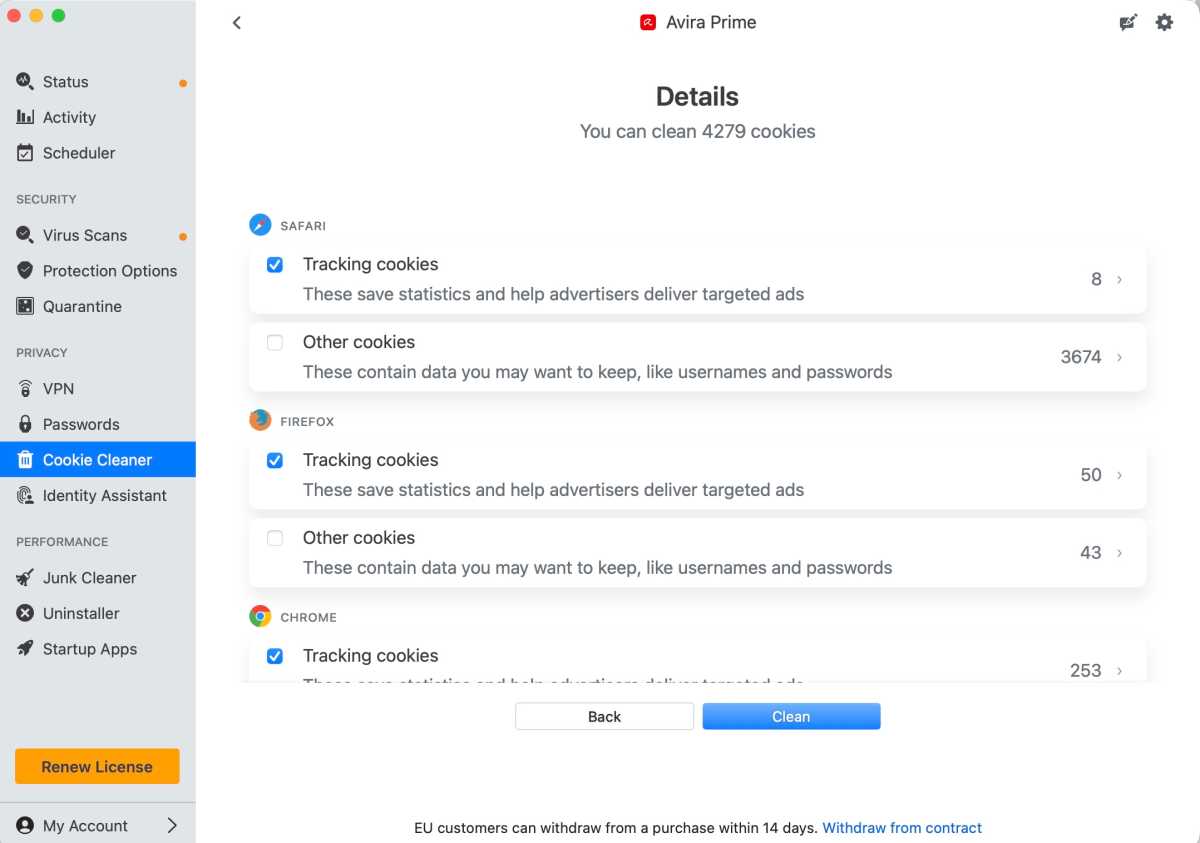
The Cookie Cleaner lets users select cookies for removal, although the lack of a search function makes navigating large lists harder than it should be.
Foundry
The Cookie Cleaner is an interesting addition and offers tight control over cookie files, but comes with some drawbacks.
Once you’ve activated the feature and quit your open web browsers, the tool quickly scans your Mac’s cookie files. After a few minutes, it presents the dozens, hundreds, or even thousands of cookies that may be present.
The user interface is inviting, but it offers no search function for finding specific cookies, leaving you to scroll through websites and domain names displayed in a scattered, non-alphabetical order. What should be a straightforward process begins to feel like a chore, and a better way of navigating the results is needed.
Avira’s efforts towards an Identity Assistant and overall identity protection are nothing new in the current marketplace, and the feature feels more like an additional value-add than something genuinely unique.
The feature offers dark-web monitoring and allows users to provide personal information they want to track. However, it requires an additional subscription for certain levels of coverage, and the lack of a free trial for these services makes it difficult to judge their value before committing.
More importantly, the feature failed to work properly during testing. Attempts to load the initial scan and personal-information entry screen produced web-based error messages in Safari, Chrome, Firefox, Edge, and Opera rather than a functioning interface.
That server-side error persisted throughout testing, making the Identity Assistant’s actual effectiveness impossible to gauge. It’s disappointing to encounter such a basic problem in a paid security suite.
Junk Cleaner, Uninstaller, and Startup Apps
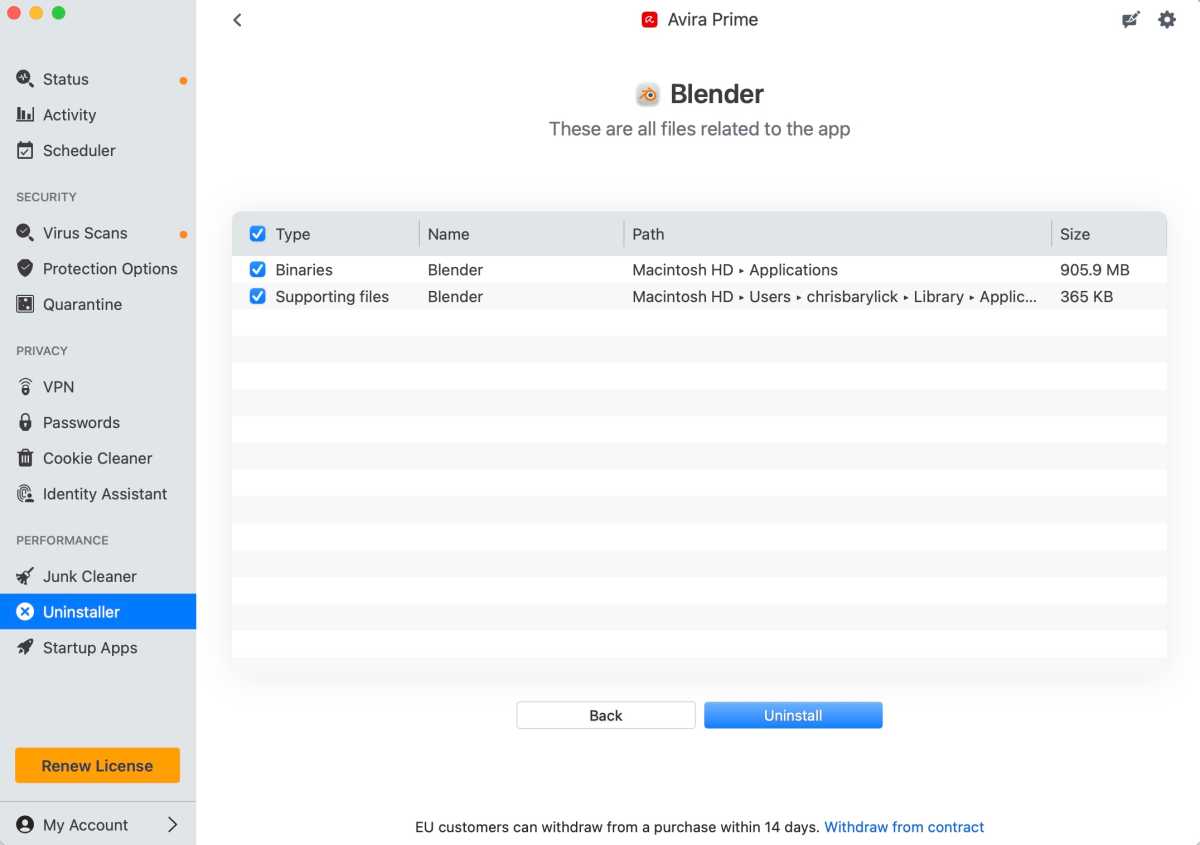
Avira Prime’s Uninstaller removes an older version of Blender and its associated support files.
Foundry
Where Avira Prime’s Identity Assistant proved a stumbling block, its Junk Cleaner helped redeem the suite.
As seems to be the convention these days, the feature hunts down cache files, downloads, reports, logs, and Xcode files. On the test MacBook Pro, it offered to clean about 2.67GB of data without automatically going after everything in the Downloads folder, which would have cleared another 46.34GB.
This is backed by an elegant interface that lets you click on specific files and choose exactly which items you want to remove, rather than inadvertently targeting a large swath of data that may be unrecoverable afterwards. It’s a welcome level of control.
Avira’s Uninstaller and Startup Apps features may not be revolutionary, but they’re genuinely impressive in their simplicity.
The Uninstaller allows you to drag and drop an application onto the tool or scan your installed applications, then cleanly removes the selected software and its associated support files. It’s especially useful when you want to remove more than just the main application from the Applications folder.
The Startup Apps tool offers much the same level of control as the corresponding settings in macOS, allowing you to toggle startup items on or off. It’s a convenient addition, although it doesn’t go much further than the tools already built into the operating system.
Test results: How well does Avira Prime protect your Mac
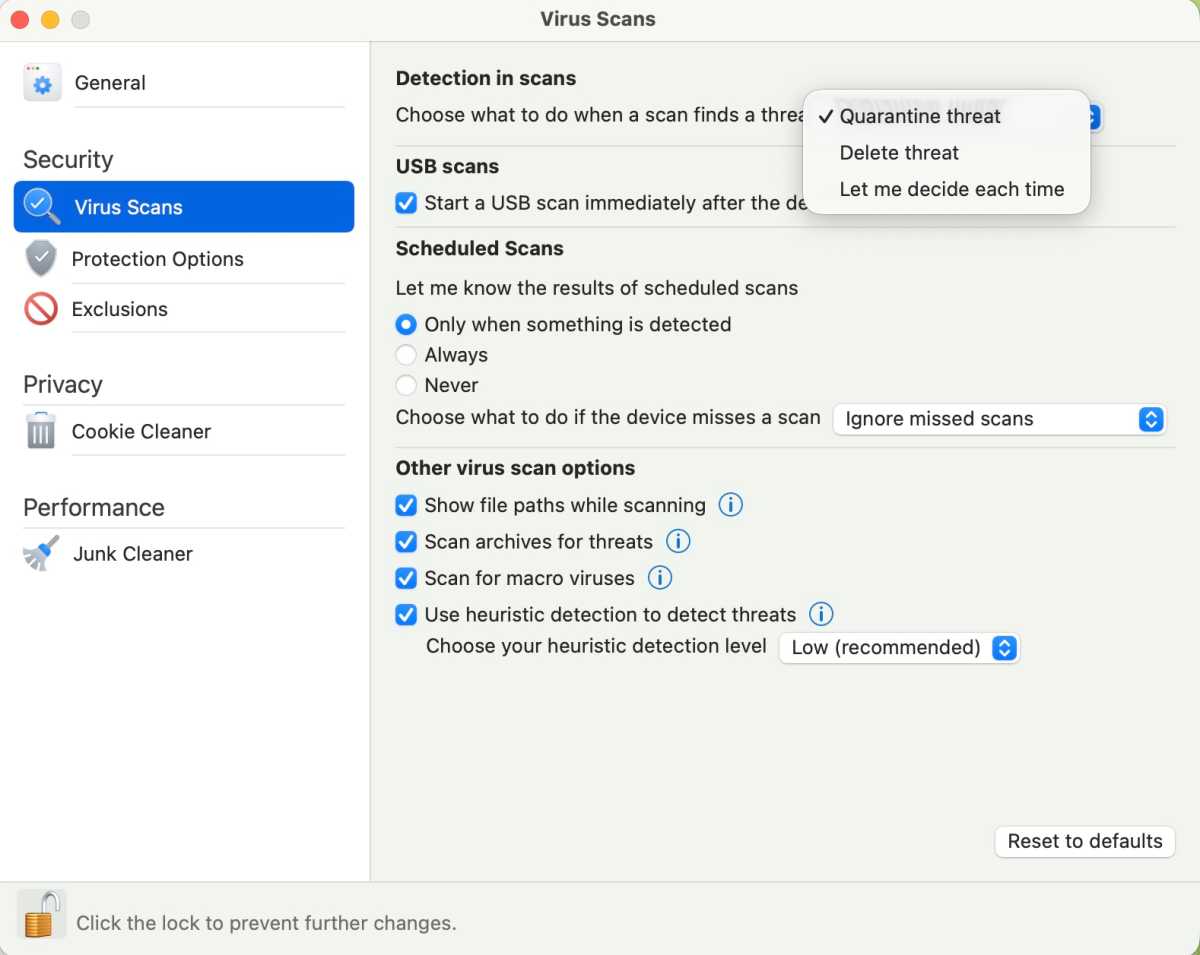
Virus scan settings allow users to customize Avira Prime’s protection behaviour and scanning preferences.
Foundry
Antivirus and malware removal remain the strongest parts of Avira Prime, and the new version performed well in hands-on testing against more than 130 malware samples from the Objective-See Mac malware archive.
The application was able to eliminate all but a few of the samples, sometimes deleting chunks of malware as they were extracted from their archives. In these situations, it worked well alongside macOS’s built-in XProtect and Gatekeeper protections, which add their own layers of defence.
Avira Prime wasn’t completely successful, however. Elements of DevilRobber, FlexibleFerret, Lamzev, MacKeeper, notnullOSX, and SentinelSneak remained after testing.
While the software appeared to remove the executable components of some threats, it occasionally left other files behind, including developer-related files. This was worrying, although the presence of leftover files doesn’t necessarily mean that the malware remained capable of executing or causing harm.
These findings are worth bearing in mind. Avira’s core protection is impressive, but it isn’t invincible, and users should not assume that every component associated with a detected threat will necessarily be removed.
The application’s presentation of scan progress is another significant strength. A clear progress bar, elapsed time, filenames, ongoing updates, and an accurate estimated completion time make it easy to see what’s happening. This is one of the better scanning interfaces I’ve encountered in a malware utility in some time.
Independent laboratory results
Avira’s performance is also supported by independent laboratory testing.
In AV-TEST’s June 2026 assessment of Avira Security 2.3 on macOS Tahoe 26.5.1, the software achieved 6 out of 6 for protection, 6 out of 6 for performance, and 6 out of 6 for usability, earning the maximum possible overall result of 18 out of 18.
The laboratory recorded 100 percent detection of the widespread and prevalent malware in its reference set and no false positives in its reported usability tests.
These results provide a useful independent counterpoint to the occasional leftover malware components observed during our hands-on testing.
Performance: Will Avira Prime slow down your Mac?
Avira Prime’s scan performance proved solid, particularly when running Quick and Custom Scans.
A Quick Scan completed in just a few minutes, while a Full Scan of more than 633GB of data on the MacBook Pro’s SSD took just under three hours. Given the amount of data being scanned, the latter is the sort of task that might best be scheduled overnight or outside a busy workday.
The Custom Scan option is particularly useful because it allows you to focus on particular files, folders, or volumes rather than committing to a complete system scan every time. USB Protection offers a similarly convenient way to check removable storage as it’s connected.
The June 2026 AV-TEST results also awarded Avira Security 2.3 a maximum score for performance, suggesting that its effects on common activities, such as application launches and file copying, are generally well controlled.
Ease of use: Is it Mac-friendly?
Installation proved as easy as expected, with Avira Prime installing an endpoint security extension and requiring Full Disk Access. The application provided convenient access to macOS’s System Settings to authorize the necessary permissions.
Once configured, the main window offers easy access to the Security, Privacy, and Performance sections. The layout is inviting, with well-organized tools that are straightforward to locate and use.
The settings themselves offer finer control over virus scans, protection options, exclusions or whitelists, and the cookie and junk cleaners.
The Scheduler is particularly good, allowing you to quickly create a roster of recurring Smart Scans and Virus Scans that can be edited later. There’s no need to dig through obscure settings to create a recurring task, and the feature is impressive in its simplicity.
Finally, the Activity section provides a useful reference point for seeing which tests were performed on particular dates, helping complete the picture of your history with Avira Prime.
Not everything is quite as polished. The lack of a search function in the Cookie Cleaner makes navigating large lists unnecessarily difficult, while the limited Quarantine reporting and absence of a convenient scan-log export option become more frustrating when trying to investigate a particular threat.
Overall, though, Avira Prime offers a clean and generally approachable experience that makes its extensive collection of tools relatively easy to manage.
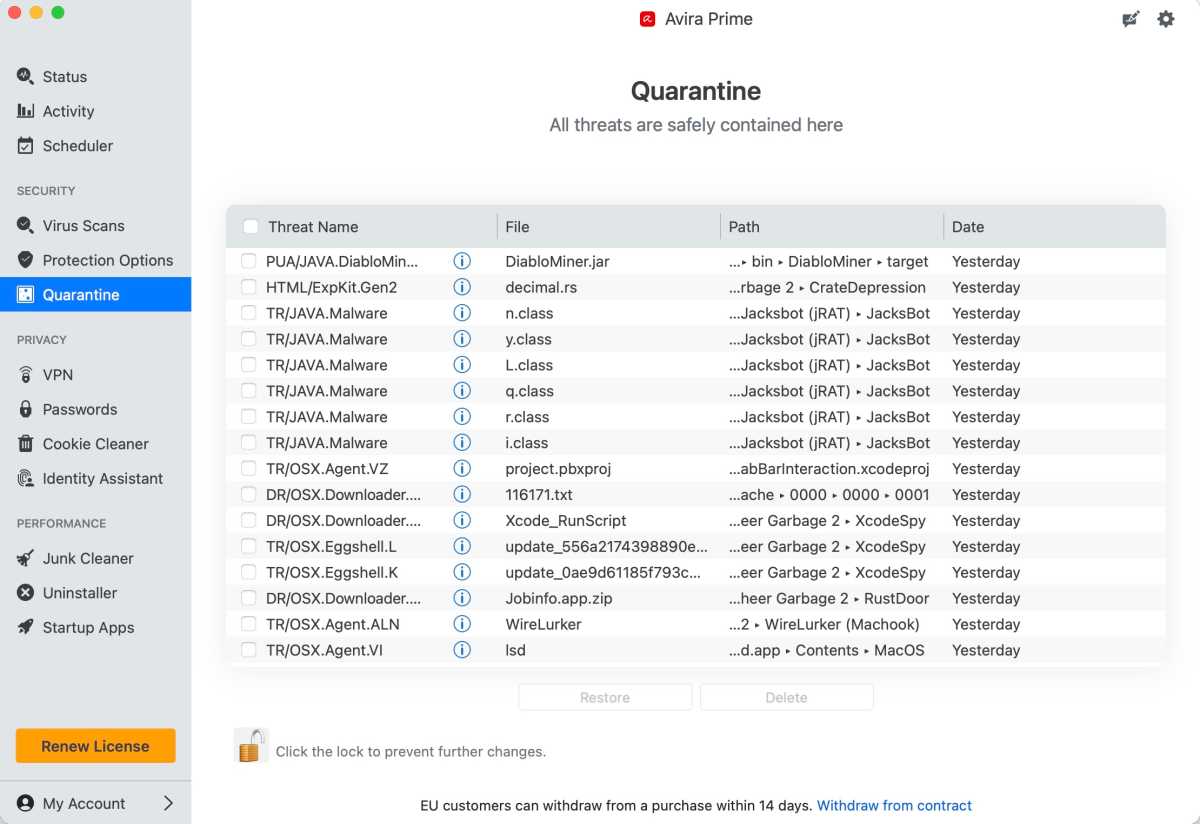
The Quarantine tool displays detected files and their locations, although more convenient log-export options would be welcome.
Foundry
Pricing and plans: Is Avira Prime worth the money?
Avira Prime is available as a subscription covering multiple devices across macOS, Windows, iOS, and Android, with introductory pricing that makes the suite more attractive than its longer-term renewal cost.
At the time of testing, the five-device plan was listed at $59.99/£51.99 for the first year, increasing to $109.99/£94.99 annually on renewal. A plan covering up to 25 devices was also listed at $134.99/£116.99 for the first year, with the same figure quoted for subsequent years.
A 30-day free trial is available after creating an account through Avira’s website, with no credit or debit card information required during the sign-up process.
Compared with using Avira Free Security for Mac, the appeal of Prime is therefore largely in the additional utilities and services. The core antivirus features remain strong, but Prime adds cleanup, application-removal, privacy, and VPN capabilities in one subscription.
Whether that’s good value depends on how many of these tools you’ll actually use. The Junk Cleaner and Uninstaller are useful additions, while the VPN is adequate for everyday purposes. The Identity Assistant’s failure to load, however, makes it difficult to recommend paying extra for its additional identity-monitoring coverage.
Avira Prime offers a lot of functionality, but the longer-term cost becomes harder to justify if you only need its antivirus capabilities.
How we tested
Avira Prime 2.3.10 was tested in-house on a MacBook Pro running macOS Tahoe 26.6.2.
Testing included more than 130 malware samples from the Objective-See Mac malware collection, with a focus on malware detection and removal, scanning behaviour, and the application’s ability to manage infected files and volumes.
Quick, Full, and Custom Scans were evaluated, including a Full Scan of more than 633GB of data. The suite’s additional features, including Phantom VPN, Password Manager, Cookie Cleaner, Identity Assistant, Junk Cleaner, Uninstaller, Startup Apps, and Scheduler, were also examined for functionality and ease of use.
Results were compared with independent AV-TEST laboratory findings where applicable.
Should you buy Avira Prime for Mac
The new version of Avira Prime proves to be one of the better antivirus and anti-malware utilities I’ve tested in some time, although there are still areas that need improvement.
Its malware scanning interface, scheduler, junk removal, and application-removal tools are genuinely impressive, and the overall suite offers a useful set of features without becoming excessively complicated.
The occasional malware components left behind during testing are a concern, while the Cookie Cleaner’s lack of search, limited scan-log exports, and the server-side error that made Identity Assistant impossible to evaluate all represent missed opportunities. The bare-bones VPN also won’t suit everyone, particularly users who need more advanced networking features.
These issues aren’t necessarily deal-breakers, but they’re worth considering alongside the subscription price, especially after the introductory offer expires.
Despite these shortcomings, Avira Prime’s core security and maintenance functions remain strong. It’s well worth evaluating during the advertised 30-day trial to determine whether its combination of protection and additional utilities is right for you.
See how Avira Prime compares to other Mac antivirus solutions in our round up of the best.